
Encryption and the recovery code
There are two different things here and they are easy to confuse. Knowing which is which is the whole point of this page.
1. End-to-end encryption
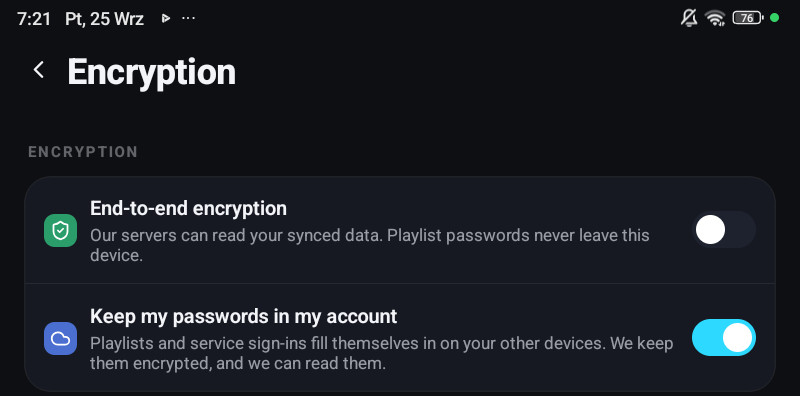
Section titled “1. End-to-end encryption”Settings → Encryption → End-to-end encryption, on a phone or a tablet. A television and a computer cannot turn it on; they only unlock it, see below. It encrypts what syncs to your account, so it needs you signed in: turning it on while signed out takes you to sign in first.
With it on, your synced data is encrypted on the device before anything is uploaded, with a key made from a recovery code only you hold. What reaches the cloud is unreadable bytes. There is no key on the server, so your synced data, playlist URLs, logins and passwords included, cannot be read there, by us or by anyone who obtains the data. The one exception is the separate switch below: what it keeps in your account stays readable to us.
The row under the switch says where you stand:
| It says | Meaning |
|---|---|
| Our servers can read your synced data. Xtream passwords, MAC addresses and service sign-ins are not synced. | Encryption off, passwords kept only on the devices |
| Our servers can read your synced data and the passwords kept in your account. | Encryption off, passwords kept in your account |
| Only your devices can read your synced data — playlist passwords included | Encryption on |
| Only your devices can read your synced data. We can still read the passwords kept in your account. | Encryption on, passwords also kept in your account |
Turning it on
Section titled “Turning it on”- Settings → Encryption, switch on End-to-end encryption.
- The app suggests saving a backup file first.
- Generate my recovery code. The app encrypts your data, which takes a moment.
- Save your recovery code: copy it or share it somewhere safe, such as a password manager.
- Tick I saved my recovery code. Done works only after the tick.
- Optionally Add a sync password, see below.
Your other devices then show Sync is locked until you unlock them once.
Turning it off
Section titled “Turning it off”Switch it off and confirm Turn off encryption?. Your synced data becomes readable by our servers again, and the sync password stops working. Provider passwords stop syncing too, unless Keep my passwords in my account is on.
Devices that cannot use it
Section titled “Devices that cannot use it”A few Android TV boxes cannot keep the key safely. They say End-to-end encryption cannot be used on this device instead of failing. They still sync when encryption is off.
The recovery code
Section titled “The recovery code”54 characters in nine groups of six, with a checksum and no letters that look like digits. Type it on a second device and everything unlocks.
Show recovery code in the same section displays it. Write it down.
Lose it and the data stays encrypted. That is not a support problem that can be solved. It is the property you turned on.
The sync password
Section titled “The sync password”An alternative to typing 54 characters: Sync password sets a password of at least 10 characters, used to unlock a new device instead. It is checked on your device, so we never see it. The recovery code still works, and always will. Remove password takes it away again, after which new devices need the recovery code.
When a device says sync is locked
Section titled “When a device says sync is locked”A device that has your account but not the key shows Sync is locked and asks for the recovery code or the sync password (Use sync password instead and Use recovery code instead switch between them). Until then it will not read your synced data, and playlists waiting in the account cannot be restored. During the first start it says Your synced data is locked with Unlock sync and Continue without restoring.
| Where | How |
|---|---|
| Phone or tablet | Settings → Encryption → Sync is locked |
| Television, computer, LG and Samsung TVs | Settings → Sync → Unlock sync, then Recovery code or Sync password |
| From a phone that is unlocked | Settings → Devices, the device, Send your data: it hands the key over, so the locked device unlocks without typing anything |
| Account panel | Unlock your account when you sign in, for that browser tab only |
The QR code you scan to set up a television does not carry the key: send it afterwards with Send your data, or type the code.
Lost the code and the password
Section titled “Lost the code and the password”I lost my code — start fresh from this device, on the unlock screen of a phone, makes that phone the source. It asks twice: Start fresh from this device? warns that everything in the cloud is replaced with the data on this phone and that anything existing only on your other devices is lost for good, then Replace cloud data. You get a new recovery code, and your other devices need that one from then on.
2. “Keep my passwords in my account”
Section titled “2. “Keep my passwords in my account””A single switch: Settings → Encryption on a phone, Settings → Account on a television, a computer and LG and Samsung TVs. It shows only while you are signed in. It decides whether provider passwords, MAC portal addresses and your OpenSubtitles, TMDB, Google Gemini, Trakt and SIMKL sign-ins are stored in your account at all.
- Off: passwords and sign-ins stay on the device that typed them. A new device has to be given them, by QR code, or by typing them again, and Trakt is connected with a code on each device.
- On: every device you sign in to has the playlist ready at once, with nothing to type and no code to carry. The Trakt account and the TMDB sign-in of each profile follow the same way.
A new account starts with it on. An account that already existed keeps what it had, which is off unless somebody turned it on. Without an account it is always off.
Turning the switch off asks first, Forget the saved passwords?, and removes the stored copies; every device keeps the passwords it already has. Deleting a playlist removes its copy too. Signing out always behaves as if the switch were off. The account panel shows the switch but does not change it.
Until version 1.7.1 this was three separate checkboxes, one in the Xtream form and one on each integration card, for what is one question about one account. It is one row now, and one setting for the whole account.
