
EPG and Guide settings
Settings → EPG & Guide on a phone and on a television, where it is in the Library group.
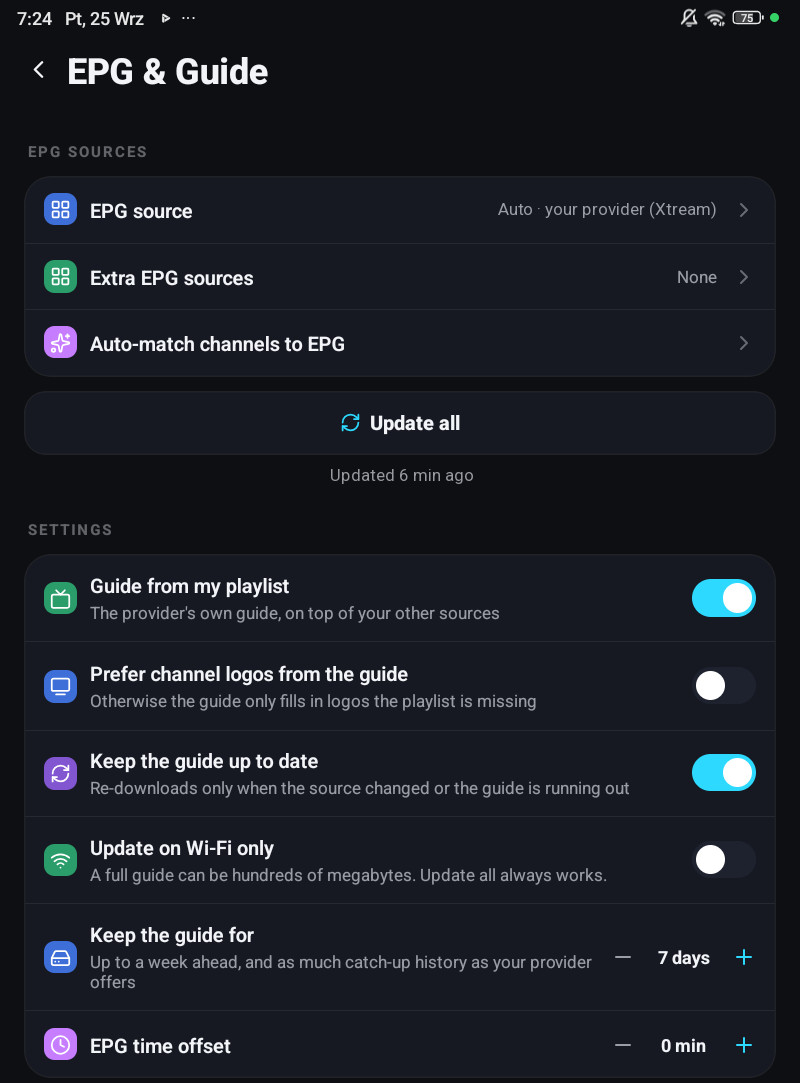
The screen has two sections, with Update all between them on a phone. Rows marked account follow your account to your other devices and are edited in the account panel too, on its Guide page; device rows stay on the device.
EPG sources
| Row | Default | What it does |
|---|---|---|
| EPG source | automatic | What the app resolved for this playlist: Auto · host (Xtream), XMLTV · host, or Not set. On a phone, tap it to type a guide address of your own, Save to use it, or save it empty to go back to automatic. Account |
| Extra EPG sources | none | Any number of XMLTV addresses of your own, each for all playlists or one. See Adding your own XMLTV. Account |
| Auto-match channels to EPG | Links channels that have no programmes to a guide channel, all at once | |
| Update all | Fetches every guide that is due, and shows under it when it last succeeded, or what went wrong |
Settings
| Row | Options | Default | What it does |
|---|---|---|---|
| Guide from my playlist | on / off | on | The provider’s own guide, on top of your other sources. Account |
| Prefer channel logos from the guide | on / off | off | Otherwise the guide only fills in logos the playlist is missing. Account |
| Keep the guide up to date | on / off | on | Re-downloads only when the source changed or the guide is running out. Account |
| Update on Wi-Fi only | on / off | off | Phone and tablet only. A full guide can be hundreds of megabytes. Update all always works. Account |
| Keep the guide for | 1, 2, 3 or 7 days | 7 days | How many days ahead and back stay on the device. Device, the account panel sets it per device |
| EPG time offset | −3 h to +3 h in half-hour steps | none | Shifts every programme. Account |
On a television, Windows, the Mac and LG and Samsung TVs some rows are named differently: Extra guide sources, Match channels to the guide, Refresh the guide automatically and Guide time offset. There EPG source only shows what was resolved, Guide from my playlist shows only when the playlist provides a guide, and there is no Wi-Fi row. The television’s section also has Refresh cached lists, which re-reads categories, groups and counts if something looks out of date; on a phone that button is in Settings → Storage, next to Clear EPG cache. The clock format is in Settings → General there. Reminders are under Saved & scheduled on a phone and under Playback on a television.
Keep the guide up to date
Section titled “Keep the guide up to date”Not a fixed schedule. The app re-downloads when the source says it changed, or when the guide it has is about to run out. A television that is on every evening therefore fetches far less than one that polls on a timer. A television that blocks background work says This TV blocks background updates, the guide refreshes when you open the app.
Keep the guide for
Section titled “Keep the guide for”This is about disk, not about what your provider offers.
At 7 days the device keeps up to a week ahead and as much catch-up history as your provider offers, up to a week back. A shorter choice keeps that many days ahead and back and drops older programmes to save space, on channels with catch-up as well. The catch-up list of a channel still offers the days your provider keeps. Changing it frees the space in the background.
It stays on the device. A television with 8 GB of storage and a phone have no business sharing this number, so the account panel sets it for each device separately.
EPG time offset
Section titled “EPG time offset”Some providers publish their guide in a timezone that is neither yours nor UTC. This shifts everything by up to three hours in half-hour steps, and it does follow your account, because it is a property of the source rather than of the screen.
When only one channel is off, such as a +1 channel that shares the guide of the main channel, use the channel’s own Guide time offset instead, see Time offset.
Auto-match channels to EPG
Section titled “Auto-match channels to EPG”Runs the name matcher over the whole playlist. On a phone it reports Matched N of M channels, All channels already have EPG, or Auto-match failed; on a television Matched N of M channels or Nothing new to match.
A match you made by hand is never overwritten by it. How the matching works, and how to fix one channel with Reassign EPG, is on Where the guide comes from.
